dustapprox package#
Subpackages#
- dustapprox.io package
- dustapprox.literature package
- dustapprox.models package
- Submodules
- dustapprox.models.basemodel module
- dustapprox.models.polynomial module
PolynomialModelPolynomialModel.metaPolynomialModel.transformer_PolynomialModel.coeffs_PolynomialModel.__init__()PolynomialModel.degree_PolynomialModel.feature_namesPolynomialModel.fit()PolynomialModel.from_file()PolynomialModel.get_transformed_feature_names()PolynomialModel.namePolynomialModel.predict()PolynomialModel.to_ecsv()PolynomialModel.to_pandas()
approx_model()quick_plot_models()
- Module contents
BaseModelModelInfoPolynomialModelPolynomialModel.metaPolynomialModel.transformer_PolynomialModel.coeffs_PolynomialModel.__init__()PolynomialModel.degree_PolynomialModel.feature_namesPolynomialModel.fit()PolynomialModel.from_file()PolynomialModel.get_transformed_feature_names()PolynomialModel.namePolynomialModel.predict()PolynomialModel.to_ecsv()PolynomialModel.to_pandas()
PrecomputedModel
- dustapprox.tools package
- Submodules
- dustapprox.tools.downloader module
- dustapprox.tools.generate_model module
GridParametersGridParameters.pbsetGridParameters.atmosphere_nameGridParameters.extinction_curveGridParameters.A0GridParameters.R0GridParameters.apfieldsGridParameters.n_jobsGridParameters.A0GridParameters.R0GridParameters.__init__()GridParameters.apfieldsGridParameters.atmosphere_nameGridParameters.atmosphere_shortnameGridParameters.copy()GridParameters.extinction_curveGridParameters.generate_grid()GridParameters.model_patternGridParameters.n_jobsGridParameters.pbset
ModelParametersexport_trained_model_to_ecsv()generate_grid()main_example()train_polynomial_model()
- dustapprox.tools.grid module
- dustapprox.tools.model_characteristics module
ModelCharacteristicsRunnerModelCharacteristicsRunner.__init__()ModelCharacteristicsRunner.dataModelCharacteristicsRunner.library_pathModelCharacteristicsRunner.library_selectionModelCharacteristicsRunner.models()ModelCharacteristicsRunner.passbands()ModelCharacteristicsRunner.plot_1d_residuals()ModelCharacteristicsRunner.plot_2d_residuals()ModelCharacteristicsRunner.set_vega_zeropoints()ModelCharacteristicsRunner.testdata_pathModelCharacteristicsRunner.vega_spec_approxModelCharacteristicsRunner.what
run_model_characteristics()
- Module contents
Submodules#
dustapprox.astropy_units module#
Declare missing photometric and spectral units for use with astropy.
- class Quantity[source]#
Bases:
ndarrayA ~astropy.units.Quantity represents a number with some associated unit.
See also: https://docs.astropy.org/en/stable/units/quantity.html
- Parameters:
value (number, ~numpy.ndarray, ~astropy.units.Quantity (sequence), or str) – The numerical value of this quantity in the units given by unit. If a Quantity or sequence of them (or any other valid object with a
unitattribute), creates a new Quantity object, converting to unit units as needed. If a string, it is converted to a number or Quantity, depending on whether a unit is present.unit (unit-like) – An object that represents the unit associated with the input value. Must be an ~astropy.units.UnitBase object or a string parseable by the
unitspackage.dtype (dtype, optional) – The dtype of the resulting Numpy array or scalar that will hold the value. If not provided, it is determined from the input, except that any integer and (non-Quantity) object inputs are converted to float by default. If None, the normal numpy.dtype introspection is used, e.g. preventing upcasting of integers.
copy (bool, optional) – If True (default), then the value is copied. Otherwise, a copy will only be made if
__array__returns a copy, if value is a nested sequence, or if a copy is needed to satisfy an explicitly givendtype. (The False option is intended mostly for internal use, to speed up initialization where a copy is known to have been made. Use with care.)order ({'C', 'F', 'A'}, optional) – Specify the order of the array. As in ~numpy.array. This parameter is ignored if the input is a Quantity and
copy=False.subok (bool, optional) – If False (default), the returned array will be forced to be a Quantity. Otherwise, Quantity subclasses will be passed through, or a subclass appropriate for the unit will be used (such as ~astropy.units.Dex for
u.dex(u.AA)).ndmin (int, optional) – Specifies the minimum number of dimensions that the resulting array should have. Ones will be prepended to the shape as needed to meet this requirement. This parameter is ignored if the input is a Quantity and
copy=False.
- Raises:
TypeError – If the value provided is not a Python numeric type.
TypeError – If the unit provided is not either a
Unitobject or a parseable string unit.
Notes
Quantities can also be created by multiplying a number or array with a
Unit. See https://docs.astropy.org/en/latest/units/Unless the
dtypeargument is explicitly specified, integer or (non-Quantity) object inputs are converted to float by default.- static __new__(cls, value, unit=None, dtype=<class 'numpy.inexact'>, copy=True, order=None, subok=False, ndmin=0)[source]#
- Parameters:
cls (type[Self])
value (astropy.units.Quantity | ArrayLike)
- Return type:
Self
- property cgs#
Returns a copy of the current Quantity instance with CGS units. The value of the resulting object will be scaled.
- decompose(bases=())[source]#
Generates a new Quantity with the units decomposed. Decomposed units have only irreducible units in them (see astropy.units.UnitBase.decompose).
- Parameters:
bases (sequence of ~astropy.units.UnitBase, optional) – The bases to decompose into. When not provided, decomposes down to any irreducible units. When provided, the decomposed result will only contain the given units. This will raises a ~astropy.units.UnitsError if it’s not possible to do so.
- Returns:
newq – A new object equal to this quantity with units decomposed.
- Return type:
~astropy.units.Quantity
- property equivalencies#
A list of equivalencies that will be applied by default during unit conversions.
- property flat#
A 1-D iterator over the Quantity array.
This returns a
QuantityIteratorinstance, which behaves the same as the ~numpy.flatiter instance returned by ~numpy.ndarray.flat, and is similar to, but not a subclass of, Python’s built-in iterator object.
- info: QuantityInfoBase#
Container for meta information like name, description, format. This is required when the object is used as a mixin column within a table, but can be used as a general way to store meta information.
- insert(obj, values, axis=None)[source]#
Insert values along the given axis before the given indices and return a new ~astropy.units.Quantity object.
This is a thin wrapper around the numpy.insert function.
- Parameters:
obj (int, slice or sequence of int) – Object that defines the index or indices before which
valuesis inserted.values (array-like) – Values to insert. If the type of
valuesis different from that of quantity,valuesis converted to the matching type.valuesshould be shaped so that it can be broadcast appropriately The unit ofvaluesmust be consistent with this quantity.axis (int, optional) – Axis along which to insert
values. Ifaxisis None then the quantity array is flattened before insertion.
- Returns:
out – A copy of quantity with
valuesinserted. Note that the insertion does not occur in-place: a new quantity array is returned.- Return type:
~astropy.units.Quantity
Examples
>>> import astropy.units as u
>>> q = [1, 2] * u.m
>>> q.insert(0, 50 * u.cm)
<Quantity [ 0.5,  1.,  2.] m>
>>> q = [[1, 2], [3, 4]] * u.m
>>> q.insert(1, [10, 20] * u.m, axis=0)
<Quantity [[  1.,  2.],
           [ 10., 20.],
           [  3.,  4.]] m>
>>> q.insert(1, 10 * u.m, axis=1)
<Quantity [[  1., 10.,  2.],
           [  3., 10.,  4.]] m>
- property isscalar#
True if the value of this quantity is a scalar, or False if it is an array-like object.
Note
This is subtly different from numpy.isscalar in that numpy.isscalar returns False for a zero-dimensional array (e.g.
np.array(1)), while this is True for quantities, since quantities cannot represent true numpy scalars.
- item(*args)[source]#
Copy an element of an array to a scalar Quantity and return it.
Like
item()except that it always returns a Quantity, not a Python scalar.
- property si#
Returns a copy of the current Quantity instance with SI units. The value of the resulting object will be scaled.
- to(unit, equivalencies=[], copy=True)[source]#
Return a new ~astropy.units.Quantity object with the specified unit.
- Parameters:
unit (unit-like) – An object that represents the unit to convert to. Must be an ~astropy.units.UnitBase object or a string parseable by the ~astropy.units package.
equivalencies (list of tuple) – A list of equivalence pairs to try if the units are not directly convertible. See astropy:unit_equivalencies. If not provided or
[], class default equivalencies will be used (none for ~astropy.units.Quantity, but may be set for subclasses) If None, no equivalencies will be applied at all, not even any set globally or within a context.copy (bool, optional) – If True (default), then the value is copied. Otherwise, a copy will only be made if necessary.
See also
to_valueget the numerical value in a given unit.
- to_string(unit=None, precision=None, format=None, subfmt=None, *, formatter=None)[source]#
Generate a string representation of the quantity and its unit.
The behavior of this function can be altered via the numpy.set_printoptions function and its various keywords. The exception to this is the
thresholdkeyword, which is controlled via the[units.quantity]configuration itemlatex_array_threshold. This is treated separately because the numpy default of 1000 is too big for most browsers to handle.- Parameters:
unit (unit-like, optional) – Specifies the unit. If not provided, the unit used to initialize the quantity will be used.
precision (number, optional) – The level of decimal precision. If None, or not provided, it will be determined from NumPy print options.
format (str, optional) –
The format of the result. If not provided, an unadorned string is returned. Supported values are:
’latex’: Return a LaTeX-formatted string
’latex_inline’: Return a LaTeX-formatted string that uses negative exponents instead of fractions
formatter (str, callable, dict, optional) – The formatter to use for the value. If a string, it should be a valid format specifier using Python’s mini-language. If a callable, it will be treated as the default formatter for all values and will overwrite default Latex formatting for exponential notation and complex numbers. If a dict, it should map a specific type to a callable to be directly passed into numpy.array2string. If not provided, the default formatter will be used.
subfmt (str, optional) –
Subformat of the result. For the moment, only used for
format='latex'andformat='latex_inline'. Supported values are:’inline’: Use
$ ... $as delimiters.’display’: Use
$\displaystyle ... $as delimiters.
- Returns:
A string with the contents of this Quantity
- Return type:
str
- to_value(unit=None, equivalencies=[])[source]#
The numerical value, possibly in a different unit.
- Parameters:
unit (unit-like, optional) – The unit in which the value should be given. If not given or None, use the current unit.
equivalencies (list of tuple, optional) – A list of equivalence pairs to try if the units are not directly convertible (see astropy:unit_equivalencies). If not provided or
[], class default equivalencies will be used (none for ~astropy.units.Quantity, but may be set for subclasses). If None, no equivalencies will be applied at all, not even any set globally or within a context.
- Returns:
value – The value in the units specified. For arrays, this will be a view of the data if no unit conversion was necessary.
- Return type:
ndarray or scalar
See also
toGet a new instance in a different unit.
- property unit#
A ~astropy.units.UnitBase object representing the unit of this quantity.
- class Unit[source]#
Bases:
NamedUnitThe main unit class.
There are a number of different ways to construct a Unit, but always returns a UnitBase instance. If the arguments refer to an already-existing unit, that existing unit instance is returned, rather than a new one.
From a string:
Unit(s, format=None, parse_strict='silent')
Construct from a string representing a (possibly compound) unit.
The optional format keyword argument specifies the format the string is in, by default
"generic". For a description of the available formats, see astropy.units.format.The optional
parse_strictkeyword argument controls what happens when the string does not comply with the specified format. It may be one of the following:'raise': (default) raise a ValueError exception.'warn': emit a UnitParserWarning, and return a unit.'silent': return a unit silently.
With
'warn'or'silent'the parser might be able to parse the string and return a normal unit, but if it fails then an UnrecognizedUnit instance is returned.From a number:
Unit(number)
Creates a dimensionless unit.
From a UnitBase instance:
Unit(unit)
Returns the given unit unchanged.
From no arguments:
Unit()
Returns the dimensionless unit.
The last form, which creates a new Unit is described in detail below.
See also: https://docs.astropy.org/en/stable/units/
- Parameters:
st (str or list of str) – The name of the unit. If a list, the first element is the canonical (short) name, and the rest of the elements are aliases.
represents (unit-like, optional) – The unit that this named unit represents.
doc (str, optional) – A docstring describing the unit.
format (dict, optional) –
A mapping to format-specific representations of this unit. For example, for the
Ohmunit, it might be nice to have it displayed as\Omegaby thelatexformatter. In that case, format argument should be set to:{'latex': r'\Omega'}
namespace (dict, optional) – When provided, inject the unit (and all of its aliases) into the given namespace.
- Raises:
ValueError – If any of the given unit names are already in the registry.
ValueError – If any of the given unit names are not valid Python tokens.
ValueError – If
representscannot be parsed as a unit, e.g., because it is a malformed string or a |Quantity| that is not a scalar.
- property represents: UnitBase#
The unit that this named unit represents.
- has_unit(val)[source]#
Check if a unit is defined in astropy.
- Parameters:
val (Any)
- Return type:
bool
- val_in_unit(varname, value, defaultunit)[source]#
check units and convert to defaultunit or create the unit information
- Parameters:
varname (str) – name of the variable
value (object) – value of the variable, which may be unitless
defaultunit (str) – default units is unitless
- Returns:
quantity – value with units
- Return type:
Example
>>> r = 0.5
>>> print(val_in_unit("r", r, "degree"))
# UserWarning: Variable r does not have explicit units. Assuming `degree`
<Quantity(0.5, 'degree')>
>>> r = 0.5 * unit["degree"]
>>> print(val_in_unit("r", r, "degree"))
<Quantity(0.5, 'degree')>
dustapprox.extinction module#
Dust Extinction curves#
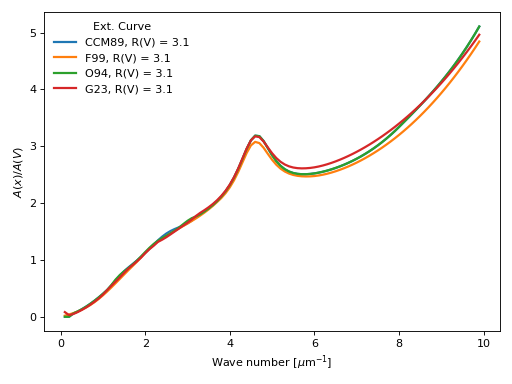
The observations show a wide range of dust column normalized extinction curves, \(A(\lambda) / A(V)\). This package provides a common interface to the dust_extinction package which includes commonly used extinction curves.
Note
This module is able to handle values with units from pyphot.astropy (intefaced to this package) and astropy. We recommend the users to provide units in their inputs.
Example of comparing extinction curves
import numpy as np
import matplotlib.pyplot as plt
import astropy.units as u

from dustapprox.extinction import evaluate_extinction_model

#define the wave numbers
x = np.arange(0.1, 10, 0.1)    # in microns^{-1}
λ = 1. / x * u.micron

curves = ["CCM89", "F99", "O94", "G23"]
R0 = 3.1

for name in curves:
    values = evaluate_extinction_model(name, λ, A0=1.0, R0=R0)
    plt.plot(x, values, label=f'{name:s}, R(V) = {R0:0.1f}', lw=2)
plt.xlabel(r'Wave number [$\mu$m$^{-1}$]')
plt.ylabel(r'$A(x)/A(V)$')
plt.legend(loc='upper left', frameon=False, title='Ext. Curve')
plt.tight_layout()
plt.show()
(Source code, png, hires.png, pdf)
- class BaseExtRvModel[source]#
Bases:
BaseExtModelBase Extinction R(V)-dependent Model. Do not use directly.
- Rv = Parameter('Rv', value=3.1)#
- param_names = ('Rv',)#
Names of the parameters that describe models of this type.
The parameters in this tuple are in the same order they should be passed in when initializing a model of a specific type. Some types of models, such as polynomial models, have a different number of parameters depending on some other property of the model, such as the degree.
When defining a custom model class the value of this attribute is automatically set by the ~astropy.modeling.Parameter attributes defined in the class body.
- evaluate_extinction_model(name, λ, A0, R0, *, extrapolate=True)[source]#
Evaluate an extinction model from dust_extinction by name at given wavelengths
This function is a quick interface that makes sure the wavelength input is properly converted to the expected units and that the extinction model is properly instantiated.
Note: dust_extinction assumes evaluation at wavenumbers, here in wavelengths.
- Parameters:
name (str or BaseExtRvModel) – Name of the extinction model from dust_extinction.parameter_averages or an instance of dust_extinction.parameter_averages.BaseExtRvModel
λ (array-like or Quantity) – Wavelength(s) at which to evaluate the extinction model
A0 (float) – Initial amplitude of the extinction curve
R0 (float) – Initial slope of the extinction curve
extrapolate (bool) – Whether to allow extrapolation beyond the model’s valid range in R0
- Returns:
Evaluated extinction curve values at the given wavelengths
- Return type:
np.ndarray
- get_extinction_model(name)[source]#
Get an extinction model from dust_extinction by name
- Parameters:
name (str or BaseExtRvModel) – Name of the extinction model from dust_extinction.parameter_averages or an instance of dust_extinction.parameter_averages.BaseExtRvModel
- Returns:
Instance of the requested extinction model
- Return type:
dustapprox.legacy_extinction module#
Dust Extinction curves (legacy module)#
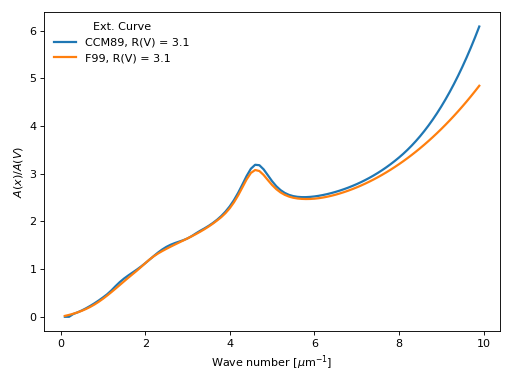
The observations show a wide range of dust column normalized extinction curves, \(A(\lambda) / A(V)\). This package provides a common interface to many commonly used extinction curves.
Important
This is a legacy module kept for backward compatibility. New code should use dustapprox.extinction instead which is based on the dust_extinction package.
Note
This module is able to handle values with units from pyphot.astropy (intefaced to this package) and astropy. We recommend the users to provide units in their inputs.
Example of comparing extinction curves
import numpy as np
import matplotlib.pyplot as plt
import astropy.units as u

from dustapprox.legacy_extinction import CCM89, F99

#define the wave numbers
x = np.arange(0.1, 10, 0.1)    # in microns^{-1}
lamb = 1. / x * u.micron

curves = [CCM89(), F99()]
Rv = 3.1

for c in curves:
    name = c.name
    plt.plot(x, c(lamb, Rv=Rv), label=f'{name:s}, R(V) = {Rv:0.1f}', lw=2)
plt.xlabel(r'Wave number [$\mu$m$^{-1}$]')
plt.ylabel(r'$A(x)/A(V)$')
plt.legend(loc='upper left', frameon=False, title='Ext. Curve')
plt.tight_layout()
plt.show()
(Source code, png, hires.png, pdf)

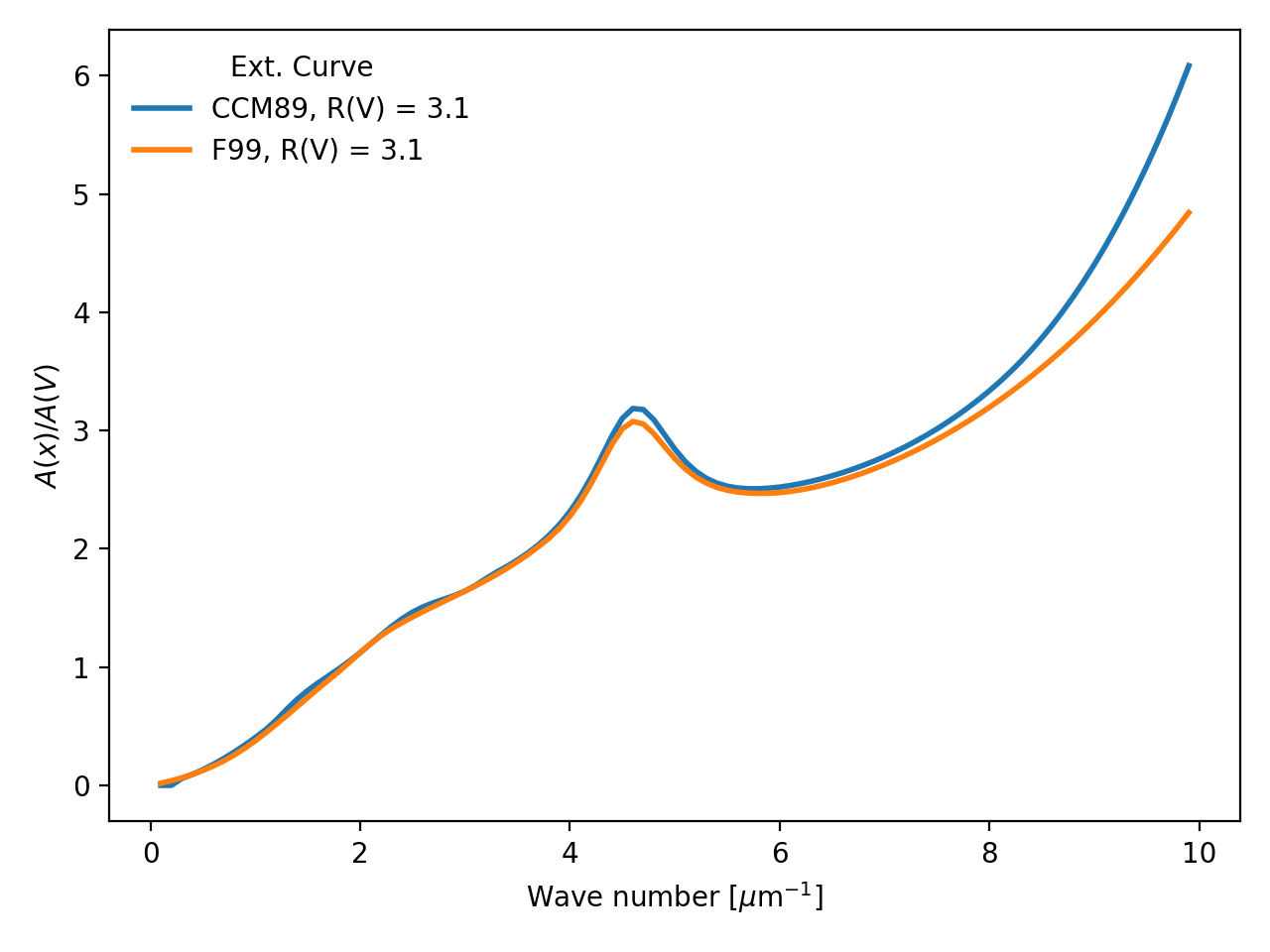
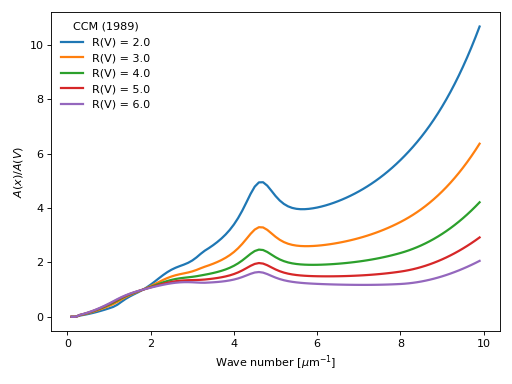
- class CCM89[source]#
Bases:
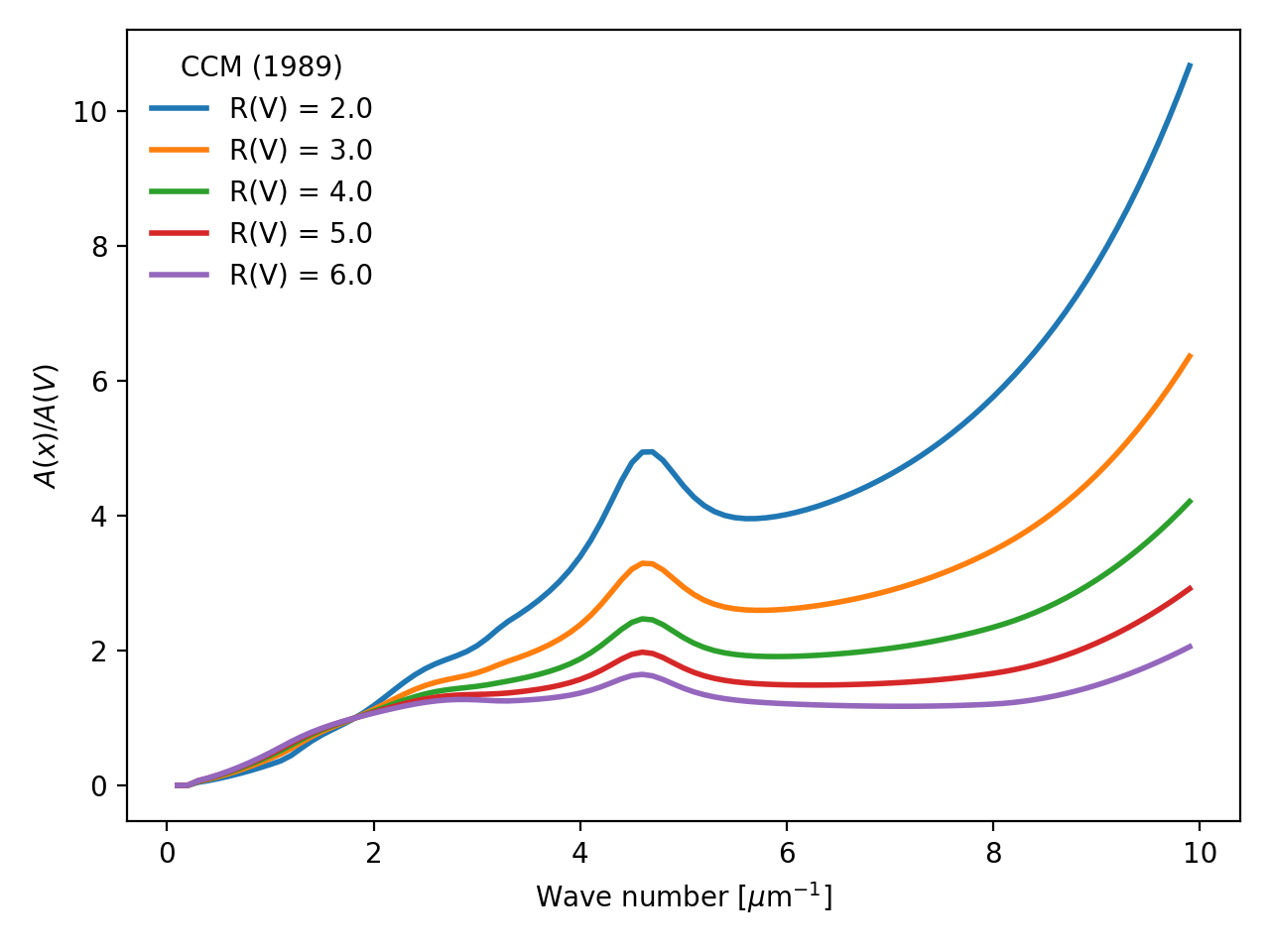
ExtinctionLawCardelli, Clayton, & Mathis (1989) Milky Way R(V) dependent model.
from Cardelli, Clayton, and Mathis (1989, ApJ, 345, 245)
Example showing CCM89 curves for a range of R(V) values.
import numpy as np
import matplotlib.pyplot as plt
import astropy.units as u

from dustapprox.legacy_extinction import CCM89

#define the wave numbers
x = np.arange(0.1, 10, 0.1)    # in microns^{-1}
lamb = 1. / x * u.micron

c = CCM89()
Rvs = np.arange(2, 6.01, 1.)

for Rv in Rvs:
    plt.plot(x, c(lamb, Rv=Rv), label=f'R(V) = {Rv:0.1f}', lw=2)
plt.xlabel(r'Wave number [$\mu$m$^{-1}$]')
plt.ylabel(r'$A(x)/A(V)$')
plt.legend(loc='upper left', frameon=False, title='CCM (1989)')
plt.tight_layout()
plt.show()
(
Source code,png,hires.png,pdf)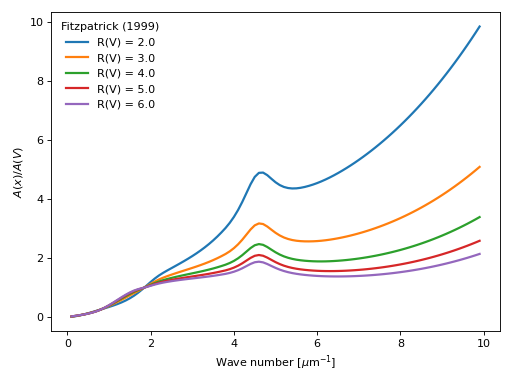
- class ExtinctionLaw[source]#
Bases:
objectTemplate function class
- name#
name of the curve
- Type:
str
- Parameters:
lamb (float, np.array, Quantity) – wavelength. User should prefer a Quantity which provides units.
- Returns:
val – expected values of the law evaluated at lamb
- Return type:
ndarray
- class F99[source]#
Bases:
ExtinctionLawFitzpatrick (1999, PASP, 111, 63) [1999PASP..111…63F]_
R(V) dependent extinction curve that explicitly deals with optical/NIR extinction being measured from broad/medium band photometry. Based on fm_unred.pro from the IDL astronomy library
- Parameters:
lamb (float or ndarray(dtype=float) or Quantity) – wavelength at which evaluate the law. units are assumed to be Angstroms if not provided
Av (float, optional) – desired A(V) (default 1.0)
Rv (float, optional) – desired R(V) (default 3.1)
Alambda (bool, optional) – if set returns +2.5*1./log(10.)*tau, tau otherwise
- Returns:
r – attenuation as a function of wavelength depending on Alambda option +2.5*1./log(10.)*tau, or tau
- Return type:
float or ndarray(dtype=float)
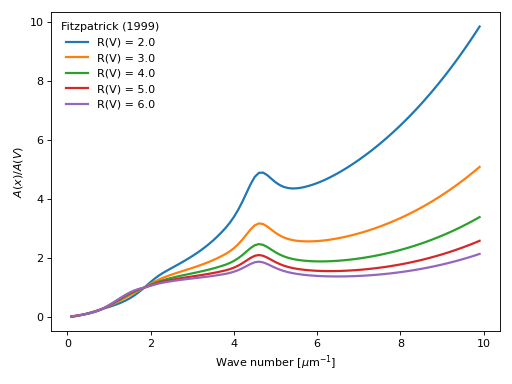
Example showing F99 curves for a range of R(V) values.
import numpy as np
import matplotlib.pyplot as plt
import astropy.units as u

from dustapprox.legacy_extinction import F99

#define the wave numbers
x = np.arange(0.1, 10, 0.1)    # in microns^{-1}
lamb = 1. / x * u.micron

c = F99()
Rvs = np.arange(2, 6.01, 1.)

for Rv in Rvs:
    plt.plot(x, c(lamb, Rv=Rv), label=f'R(V) = {Rv:0.1f}', lw=2)
plt.xlabel(r'Wave number [$\mu$m$^{-1}$]')
plt.ylabel(r'$A(x)/A(V)$')
plt.legend(loc='upper left', frameon=False, title='Fitzpatrick (1999)')
plt.tight_layout()
plt.show()
(
Source code,png,hires.png,pdf)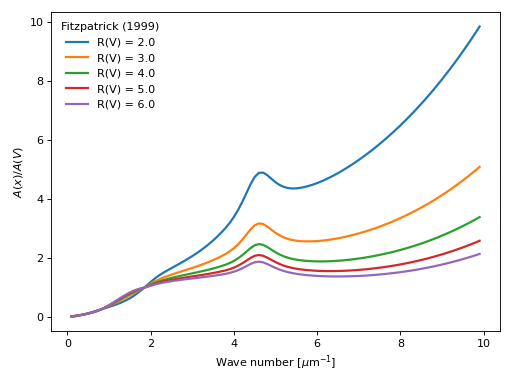
Note
this function assumed the wavelength in Anstroms if lamb is not a Quantity.